Forecasts, risks and reports
Turn the plan into the decisions that matter. Completion probability, time in status, the risk register, Executive Summary, Status report and Ask Rovo.
12 sections6 min readUpdated October 2026
Where the tools are
Plan in the chart header opens the analysis tools. Under Analyse: Completion probability, Time in status, Edit risk register and Ask Rovo. Under Organise: Edit priorities and OKRs, Edit portfolio hierarchy and Open Program board.
Share opens the two reports, Executive Summary and Status report, beside the links and exports. The reports wait until the whole plan has loaded.
A tool you cannot use is left out of the menu. Editing the risk register, priorities and OKRs or the portfolio hierarchy needs Ganttry's Plan permission on a chart opened on its own. A combined chart keeps Completion probability, Time in status and Ask Rovo; open one of its charts on its own for the others.
Completion probability
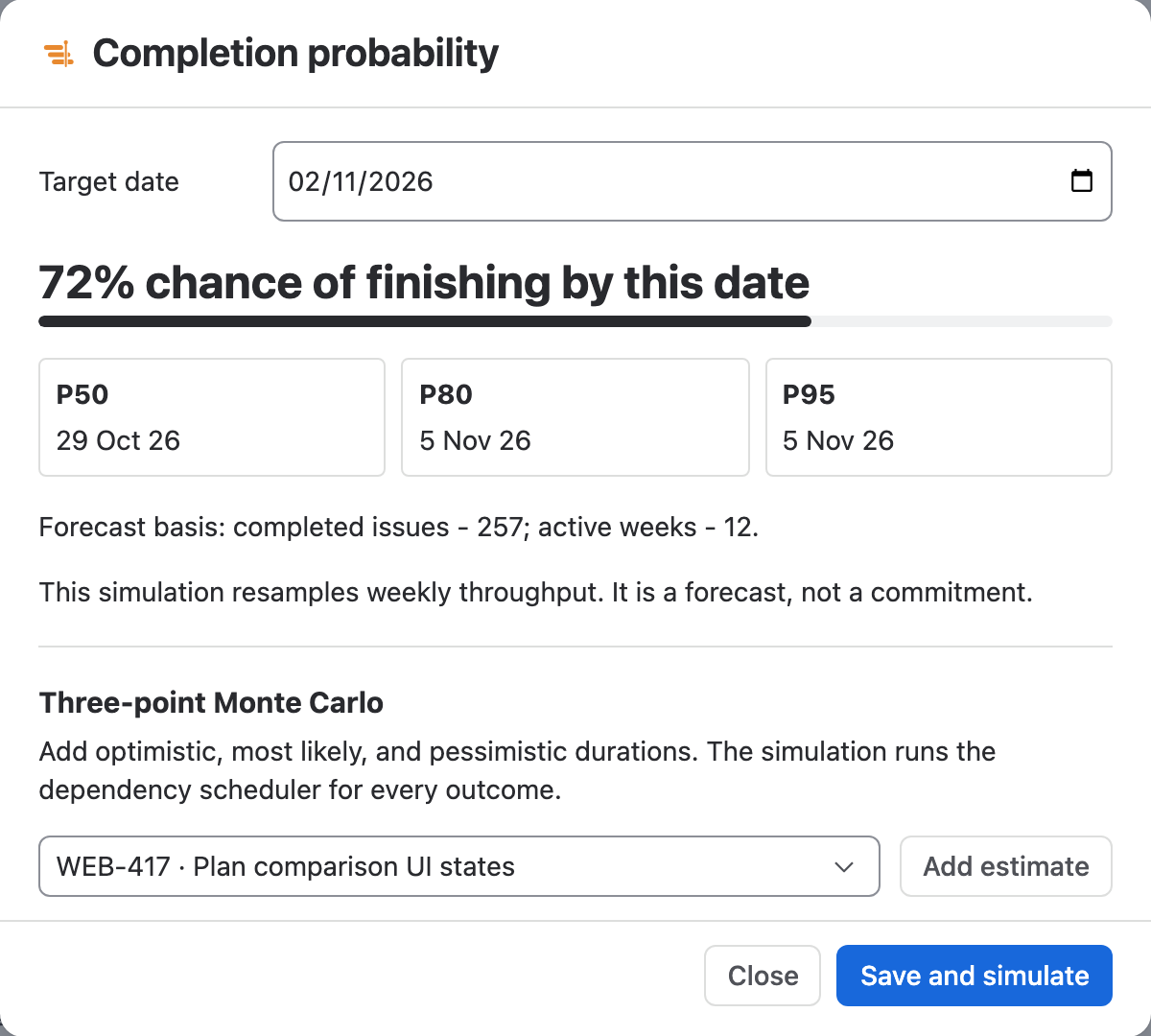
Completion probability asks how likely the remaining work is to finish by a date, from the rate the team has really finished issues over the last 12 weeks. It resamples those weeks thousands of times instead of trusting the plan's dates.
- Choose Plan → Completion probability.
- Set Target date. It starts at the plan's finish, and the date counts until the end of that day in UTC.
- Read the chance of finishing by that date and the P50, P80 and P95 dates: by P80, four in five of the simulated outcomes have finished.
Three-point estimates
Throughput treats every issue alike. Where a few issues carry the uncertainty, give them three-point estimates in the same dialog, under Three-point Monte Carlo. Ganttry then runs the dependency scheduler for every sampled outcome, so a late issue pushes the work that waits on it.
- Choose an open issue in Task and select Add estimate. The three fields start at half, once and twice its current duration.
- Adjust Optimistic hours, Most likely hours and Pessimistic hours. Each estimate must run from optimistic to pessimistic.
- Choose Save and simulate. Ganttry saves the estimates and shows the three-point chance by the target date, the P50, P80 and P95 dates and, under Sensitivity, the issues whose duration moves the finish most.
Time in status
Time in status reads each issue's own Jira history and reports where its time went. It measures the issues you marked, otherwise the selected issue, otherwise the issues shown on the chart, up to 50.
The report is Markdown, which Jira, Confluence and Slack all render: a table of each issue's current status, the status it spent longest in, and working and elapsed days, then the time across all of them. Edit the text in place and choose Copy.
Risk register
Edit risk register opens Dependencies and risks. At the top, a dependency health score out of 100 and a list of links with an end outside the loaded plan, links in a cycle, links whose successor finishes after its deadline or release, and links on the critical path; the filter narrows the list to one kind.
Under Risk register, Add risk adds a risk with Probability and Impact from 1 to 5, an Owner, a Linked issue, a Status of Open or Mitigated and the Mitigation. Exposure is probability times impact, and a mitigated risk counts zero. Delete risk removes one from the draft.
Nothing is kept until Save risks; Cancel drops every change. Risks are saved in Ganttry, not in Jira, and feed the Executive Summary.

Executive Summary
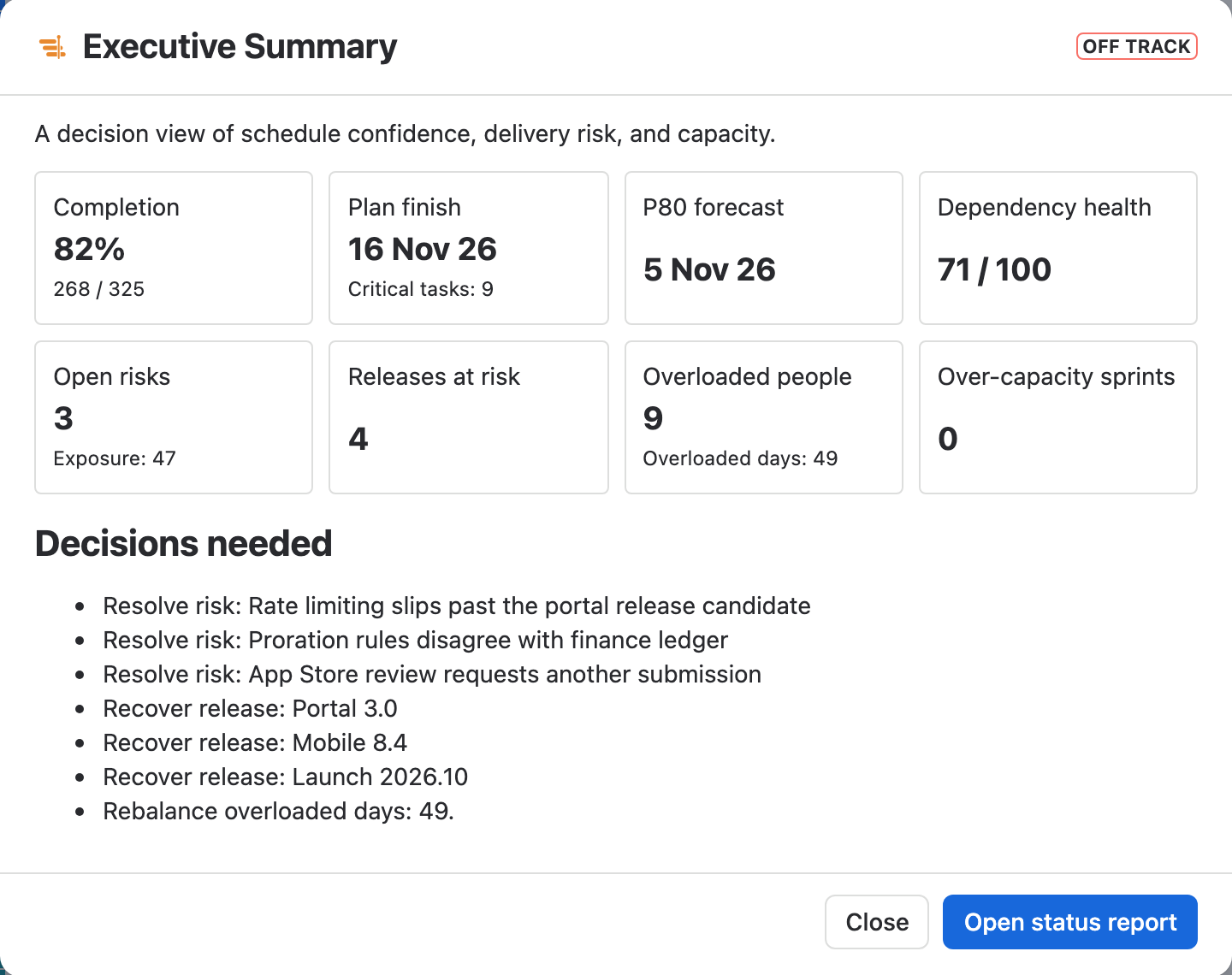
Share → Executive Summary is a decision view of schedule confidence, delivery risk and capacity. It shows completion, the plan finish with its critical tasks, the P80 forecast, dependency health, open risks with their exposure, releases at risk, overloaded people and days, over-capacity sprints and, when the chart has a baseline, the worst slip against it.
Decisions needed lists what to act on: the three most exposed risks, releases to recover, overloaded days to rebalance and the P80 finish to review. Open status report continues to the Status report.
| Status | When |
|---|---|
| Off track | A release is at risk, dependency health is below 60, or an open risk has an exposure of 20 or more. |
| At risk | The P80 forecast is later than the plan finish, or rows need attention, people or sprints are over capacity, dependency health is below 85, or any open risk has exposure. |
| On track | None of the above. |
Status report
Share → Status report writes the plan's status as Markdown: the date range, issues done, the critical path, what needs attention, and, where they apply, the finish at the team's real rate, drift against the baseline, releases, branches and over-capacity work.
Edit it in the dialog before you send it; the sentence about why is one only you can write. Copy copies the text as you left it.
Priorities and OKRs
Edit priorities and OKRs opens Portfolio priorities and OKRs. Add objective adds an objective with a target date and an owner; each key result has a current value, a target, a unit and Linked Jira work. An objective's progress is the average of its key results, and it is marked at risk when its date passes before it reaches 100%.
Add priority ranks a piece of Jira work by Business value, Urgency, Risk reduction, Effort and Confidence %. Its score is value plus urgency plus risk reduction, times confidence, divided by effort, and the ranked portfolio backlog lists the highest score first. Choose Save portfolio strategy to keep the changes in Ganttry.
Portfolio hierarchy
Edit portfolio hierarchy names the levels above Epic, from the top down, and maps each to Jira issue types with Add level, Move level up and Move level down. Jira's parent links stay the source of truth: Level roll-up counts the issues and open work on each level with their date range, and a warning reports parents of an unmapped type and parent links that point to the same or a lower level. Choose Save hierarchy.
Program board
Open Program board replaces the chart with one lane per team and a column per sprint, plus Outside sprints. Sprints named with timestamps read as dates. The board counts cross-team dependencies, highlights critical-path cards, and each card's hint names the teams that block it or wait on it. Select a card to open the issue in Jira; Close or Escape returns to the chart.
The board needs teams and sprints. Without them it asks you to configure both first.
Ask Rovo
Ask Rovo opens Ganttry Planner, a Rovo agent, with the saved plan and its scenarios, and asks it to explain the plan and compare the selected scenarios. It reads Ganttry's plan insights and has no write actions: it cannot change Jira or the plan.
Rovo has to be enabled on your Jira site. If it is not, Ganttry says so and suggests contacting your Jira administrator.
What these tools change
- None of them write to Jira.
- Three-point estimates, risks, priorities and OKRs, and the portfolio hierarchy are saved in Ganttry for the chart.
- Completion probability, Time in status, the reports, the Program board and Ask Rovo only read.
Stuck on something this guide skips? Write to the developers →