Publishing dates to Jira
Review what will change before anything is written to Jira. The changes not in Jira, the publish review, large publishes, undo and approvals.
11 sections7 min readUpdated October 2026Writes to Jira: Start and due dates of the issues you tick, and their previous dates when you undo a publish
Moving work changes the plan, not Jira
Dragging or resizing a bar, placing an issue that had no dates, editing an estimate and levelling resources change Ganttry's plan. The plan is saved in Ganttry for everyone who opens the chart, and the bars you moved by hand are hatched. Jira keeps its own dates until you publish.
The header counts what Jira does not have yet, for example 15 changes not in Jira. The count includes every issue whose planned dates differ from Jira and that you may publish, whether you moved it or Ganttry worked it out from links, estimates and calendars.
- Undo or ⌘Z reverses your last planning change. It never touches Jira.
- Plan → Reset changes clears the manual placements of the plan you are on.
- On a scenario branch the header counts the changes from its parent instead, and the button reads Merge. Only Main publishes to Jira.
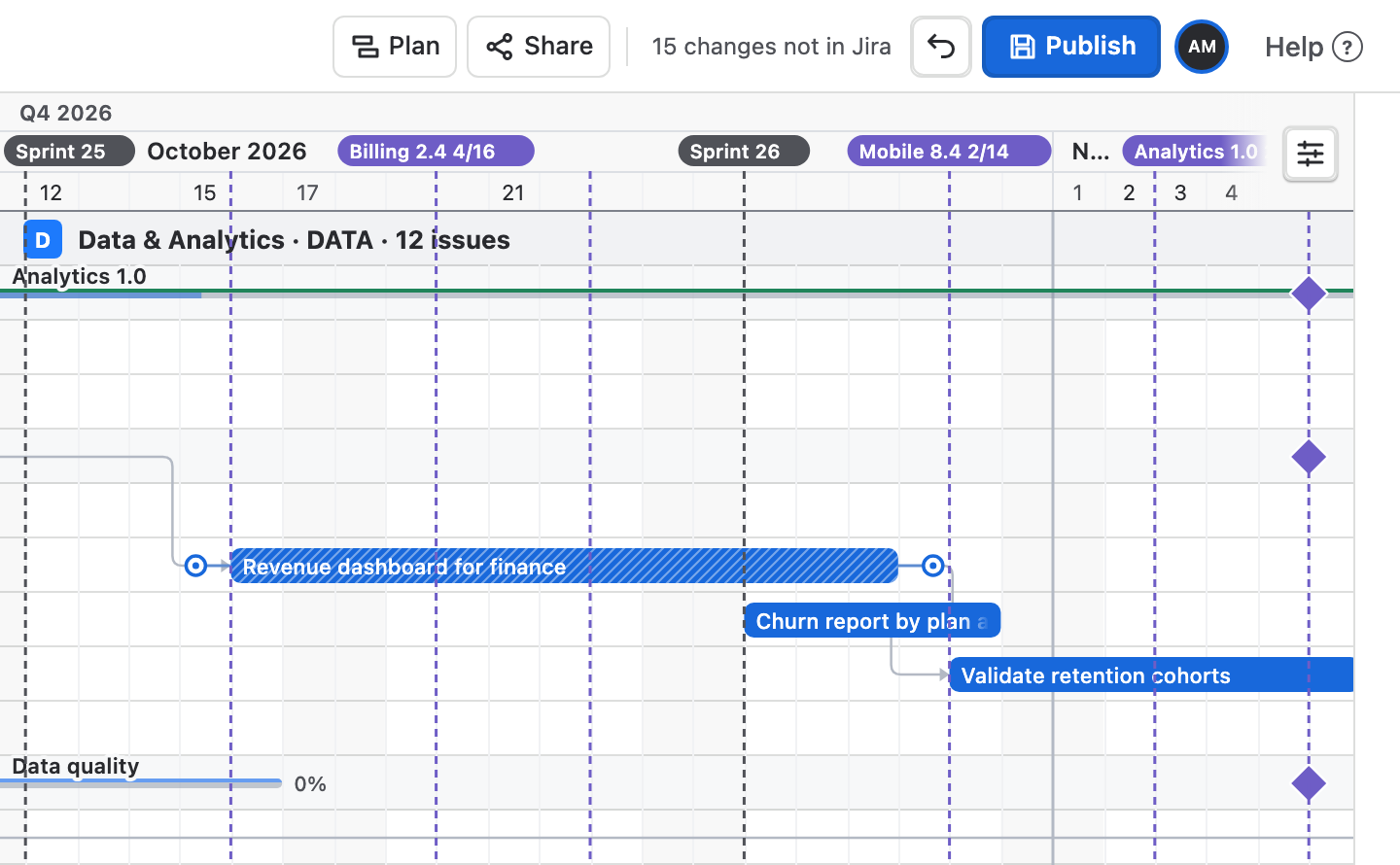
Open the publish review
- Make sure you are on Main. The branch name in the header reads Main.
- Choose Publish. A spinner shows on the button while the review is prepared.
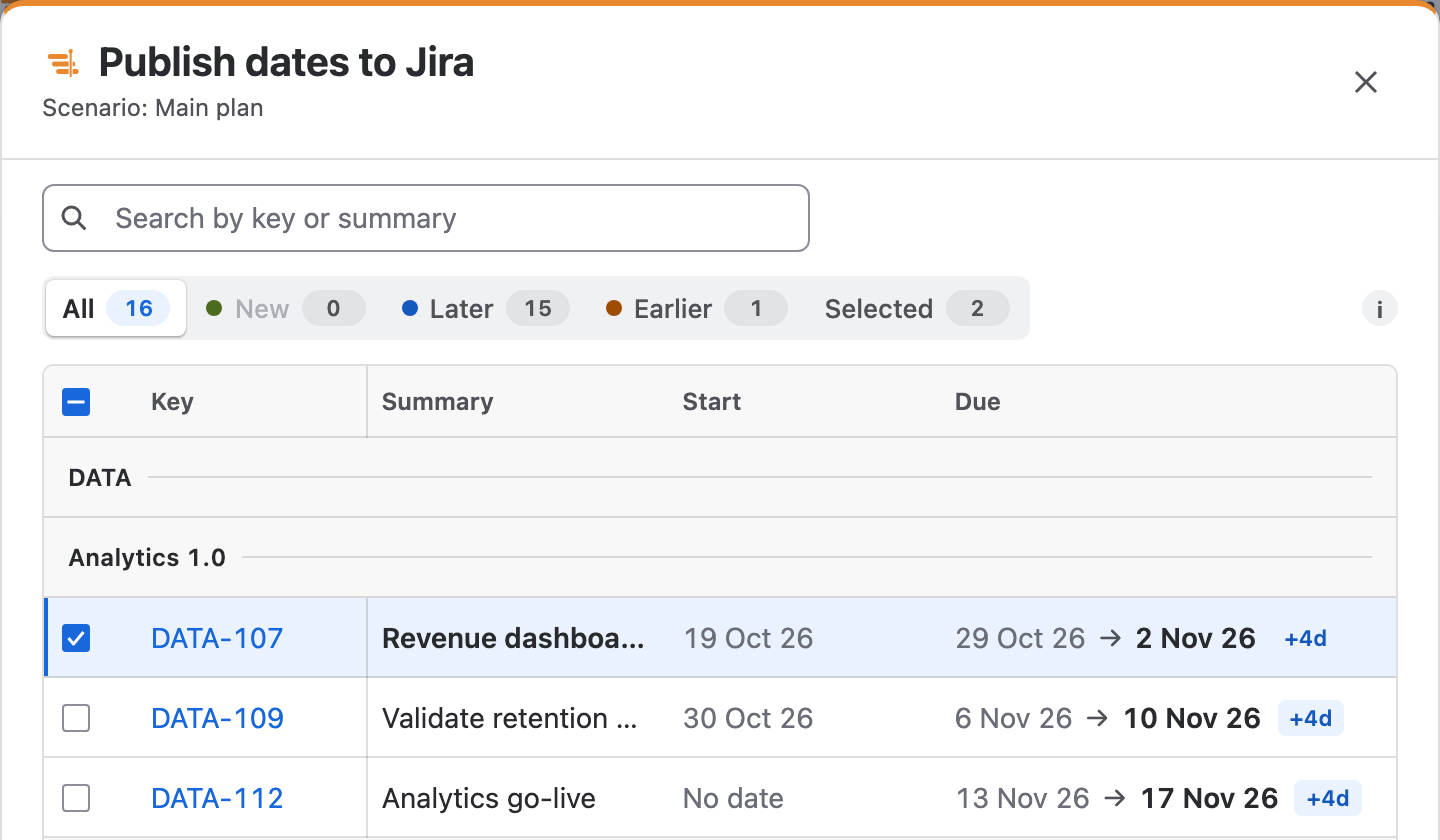
- Publish dates to Jira opens with the plan's name under the title. It lists every issue whose dates differ from Jira, in the order of the table, including rows that are folded or filtered out, under their project and parent.
- Tick the changes you want, then choose Publish … changes.
Which changes are listed and ticked
The review proposes a change only where the plan and Jira disagree. Nothing is ticked that you did not move yourself.
| The issue | In the review |
|---|---|
| You moved, resized or placed it | Listed, ticked and in bold. |
| Ganttry calculated new dates from links, estimates or calendars | Listed, not ticked. |
| Jira already has the planned dates | Not listed. |
| It has no due date in Jira, no estimate and no placement | Not listed, so Ganttry never invents a date for Jira. |
| You lack Edit Issues or Schedule Issues in its project | Not listed. |
Search, filter and select
Above the table, Search by key or summary narrows the rows and counts the matches. The buttons beside it show one kind of change at a time, each with its count: All every proposed change, New dates Jira does not have yet, Later and Earlier dates that move, and Selected the changes you have ticked.
- The checkbox in the table heading ticks or clears every change in view. With a search or a filter on, it affects only the matching changes.
- Searching or filtering never drops a tick. Publish … changes always sends everything ticked, shown or not.
- The table repeats the board's other columns in the same order and widths, and its columns can be resized.
- The footer says what publishing writes and how many changes are ticked, for example 2 of 16 selected.
Start and due dates
Start and Due each show the date Jira has now, an arrow and the planned date, with a chip such as +4d or New. No date means Jira has none.
A due date names the last day a bar covers, both when Ganttry reads it from Jira and when it publishes it. An issue that starts on Monday and is due on Friday spans five days.
Ganttry proposes a start date when your Jira site has a start date field and the issue already has a start date in Jira or was placed by hand. It writes the same start date field that it reviewed for that issue.
Publish and follow progress
After Publish … changes, the dialog becomes a progress card. Preparing publish checks the selected dates before anything is written. Publishing to Jira then writes them in short steps of up to four Jira updates at a time, with a bar and a count of the issues settled.
One publish can hold up to 10,000 issues. Before each write Ganttry reads the issue's dates in Jira again, and a change that Jira has not confirmed stays pending rather than being counted as done.
| Control | What it does |
|---|---|
| Pause | Lets the current step finish, then stops. |
| Resume | Carries on from where the publish stopped. |
| Discard | Drops a stopped publish that has not written anything yet. |
| Done | Closes the card when nothing is running. |
When Jira refuses an issue
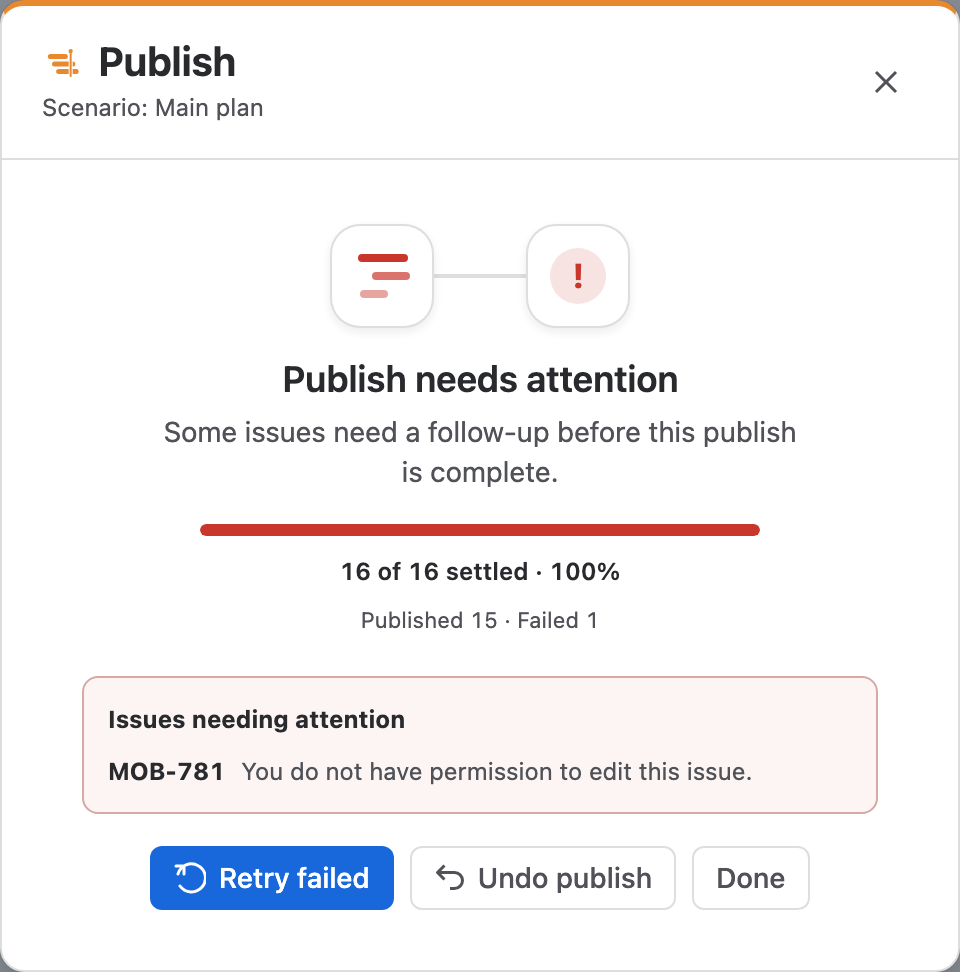
If Jira refuses some issues, the card reads Publish needs attention and lists them under Issues needing attention with Jira's reason, such as a missing permission. The issues Jira accepted stay published.
If an issue's dates changed in Jira after your review, Ganttry reports it instead of overwriting the new value. Check the issue, then publish again.
- Retry failed checks the failed issues again and retries them.
- Resume checks appears when Jira did not confirm a step, for example after a lost connection. It checks the saved progress before going on.
- When an error interrupts a publish, the message quotes a reference such as GT-0a1b2c3d. Give it to support so they can find what failed.
Undo a publish
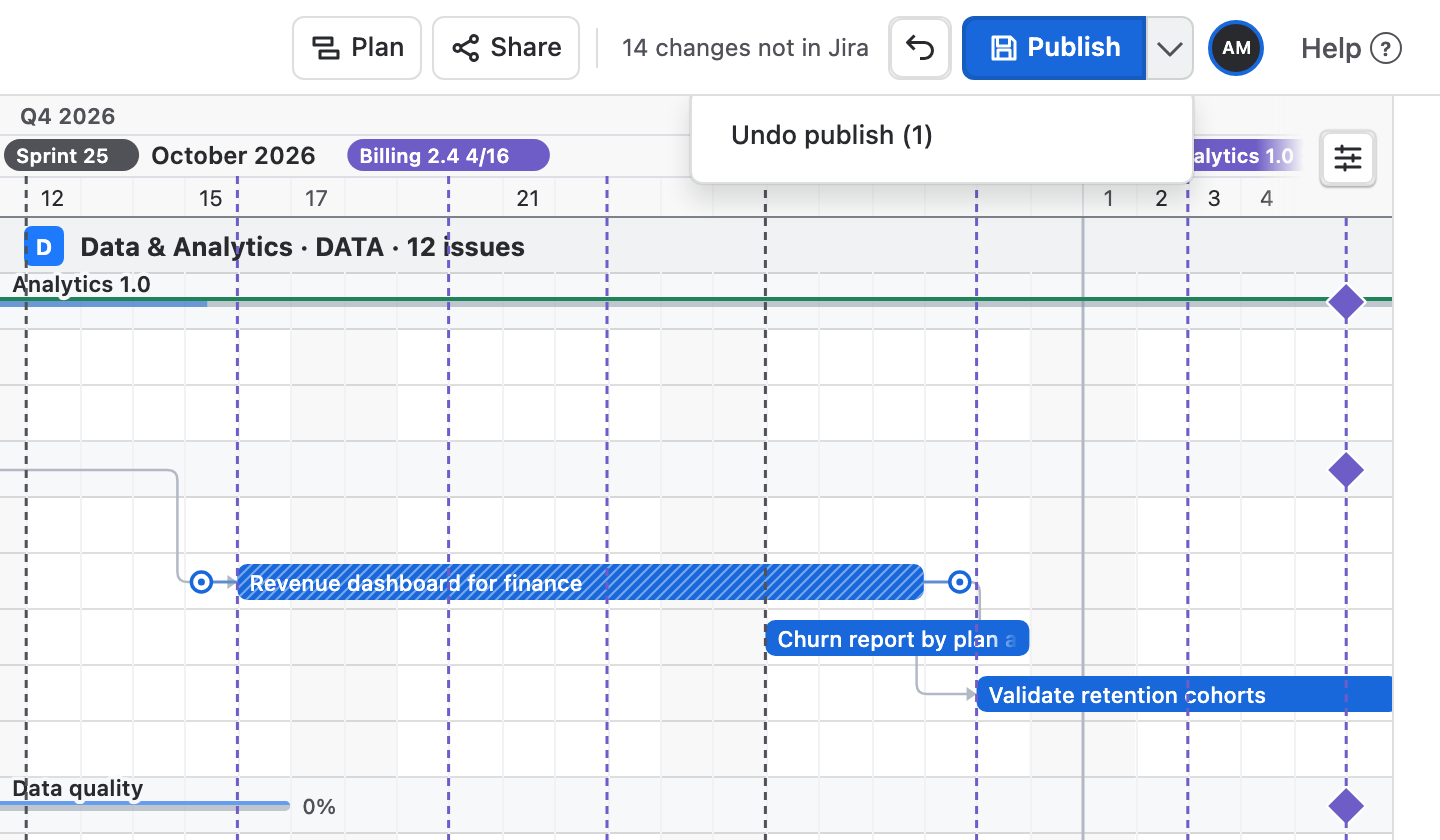
Undo publish puts back the dates the last publish wrote. It is on the progress card when a publish finishes, and afterwards under the arrow beside Publish, with the number of issues it will restore. The record survives a reload.
Before restoring an issue, Ganttry checks that its date in Jira is still the one it wrote. An issue changed in Jira since then is reported and left alone. Undo publish covers the last publish only, not a full history.
| Action | Reverses | Touches Jira |
|---|---|---|
| Undo or ⌘Z | Your last planning change | No |
| Plan → Reset changes | The manual placements of the current plan | No |
| Undo publish | The dates written by the last publish | Yes, as you |
When a publish needs approval
A Jira administrator can require approval in Plan → Activity and governance → Approvals, by ticking Require approval before publishing dates under Approval rules and choosing Save rules. A second rule there does the same for Plan in Jira.
- Publish as usual. The card reads Approval needed, and a request for this exact selection appears under Pending approvals.
- A project administrator of every project on the chart, other than you, chooses Approve or Reject. Others see the request marked Awaiting a reviewer.
- Once it is approved, choose Resume checks on the card yourself. If you closed it, Publish opens it again. The dates are written then.
- Approving writes nothing to Jira on its own.
- An approval is used once, for the selection it was given. A different selection needs a new request.
- A request is refused if the approval rules change before it is used.
Combined charts, sample plans and Confluence
- In a combined chart, the review lists each chart's changes under that chart and publishes chart by chart. A chart that fails leaves the others to publish, and Pause stops before the next chart.
- Board, filter and query charts keep their own publish record, approvals and undo.
- Sample plans never change Jira.
- The Confluence macro does not publish. Its Open in Jira button opens the same chart in Jira, where you can.
What Publish writes, and as whom
Publish writes the start and due dates of the issues you tick, and nothing else. Every write is made as you, so Jira checks your own permissions and its history shows your name.
- You need Edit Issues and Schedule Issues in an issue's project to publish its dates. Without them in any project on the chart, Publish is not shown.
- Status, assignee, new and deleted issues, links, releases and Plan in Jira are separate Jira edits. They take effect when you confirm them and never wait for Publish. See Editing issues in the chart.
Stuck on something this guide skips? Write to the developers →