Releases and Delivery
Know whether each release will land on its date. Delivery in Plan insights, forecasts, cross-project releases, milestones and release dates.
11 sections7 min readUpdated October 2026Writes to Jira: Changing a release date, undoing that change and creating a release
Open Delivery
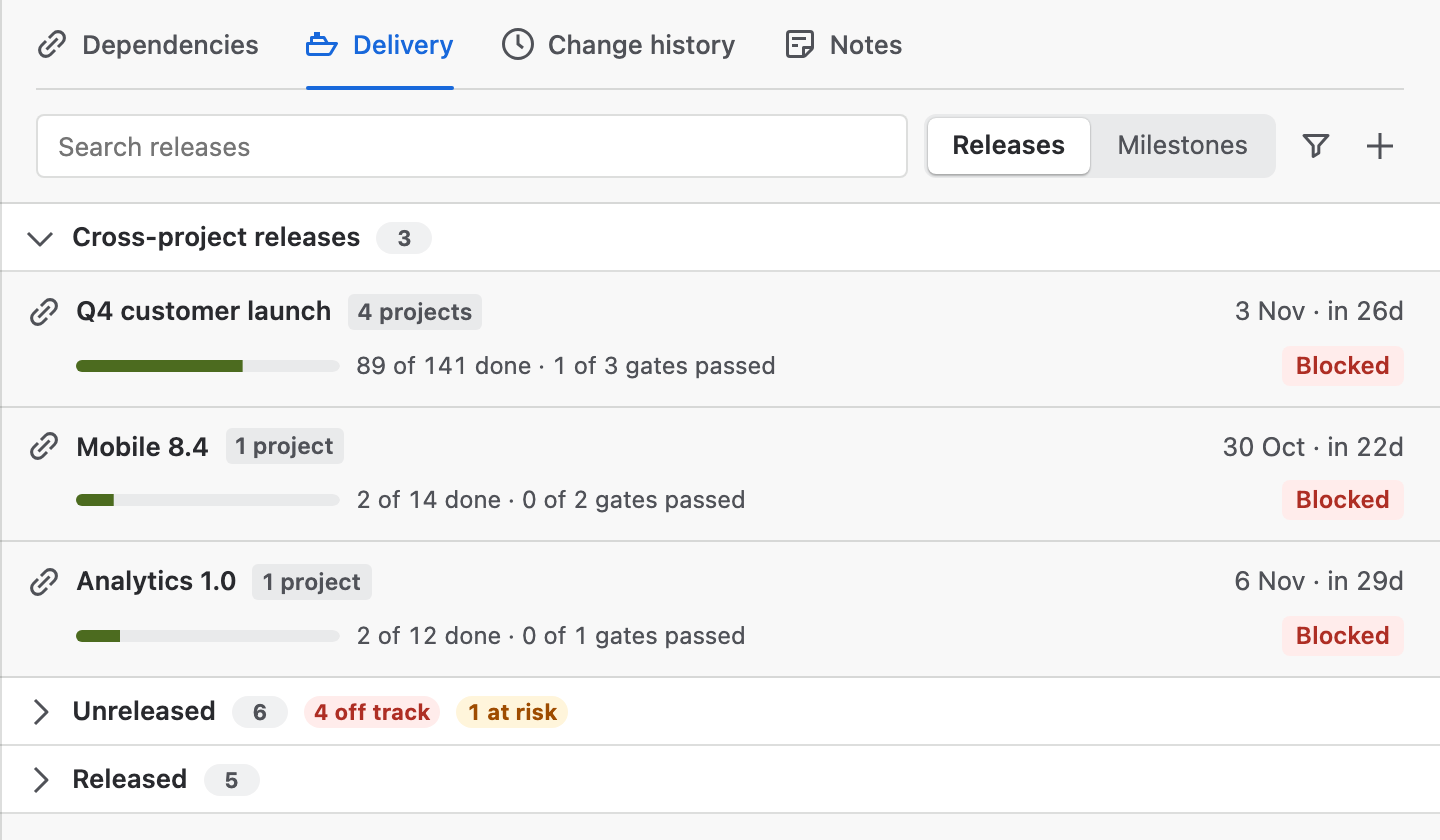
Open Plan insights on the right of the chart and choose Delivery. It lists the Jira releases of the projects on the chart, from their Fix versions, and the cross-project releases you track in Ganttry.
Cross-project releases come first. Jira releases follow by date: Unreleased, with how many are off track or at risk, then Released, folded, with how many still hold open work. Each row shows the release's project, its date and the days left or overdue, a progress bar with the issues done and in progress, and a tag.
- Search releases matches a release's name or project.
- Releases and Milestones switch between the two lists.
- Filter releases hides projects, when the chart has more than one.
- New release creates a Jira version. It appears when you may manage versions in at least one project on the chart.
Two answers for each release
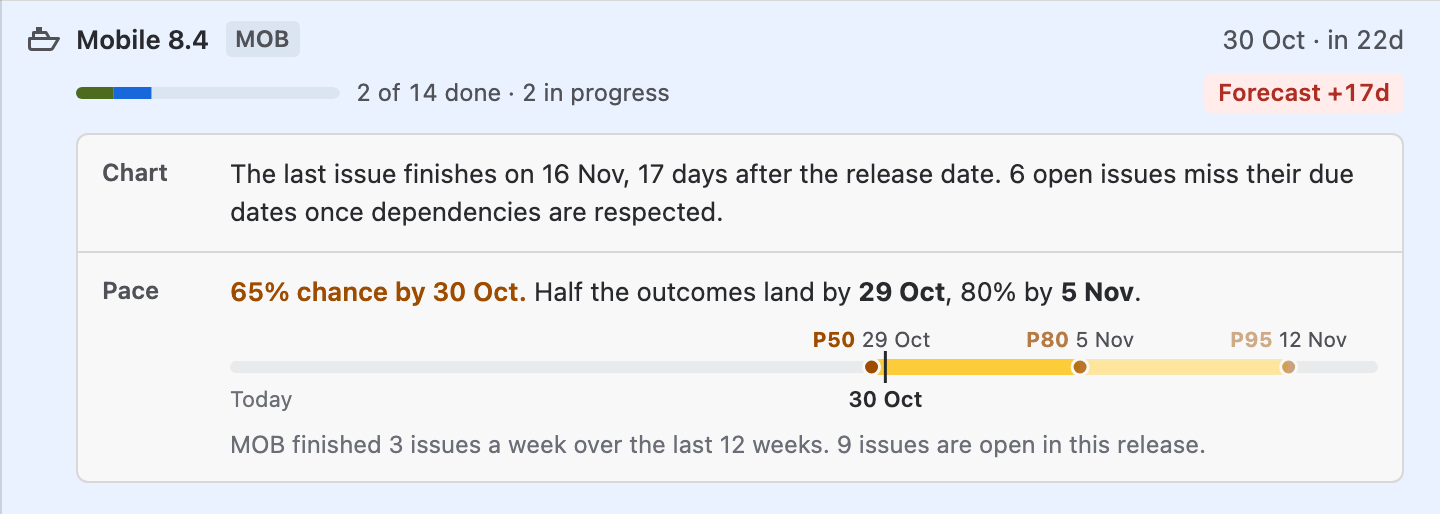
Select a release to open it. The chart scrolls to the release date, and Delivery shows two answers.
Chart reads the plan: the day the release's last issue finishes once dependencies are respected, compared with the release date, and how many open issues miss their due dates.
Pace ignores the plan and asks how fast the project really finishes work. It runs a Monte Carlo of the project's weekly throughput over the last 12 weeks against the open issues of this release and of the project's releases due before it. It gives the chance of landing by the release date and the dates by which half (P50) and four in five (P80) of the outcomes land, then draws P50, P80 and P95 on a strip beside today and the release date. The line below the strip says what the forecast is based on.
Pace needs a release date and finished work in the project over the last 12 weeks. Without either, Delivery says which one is missing and the chart's answer stands alone.
The issues behind a release
Below the answers, Delivery lists up to five issues that cause the state, under Finishes after the release date, Cannot meet the due date or Still open, with their dates and status. A longer list ends with how many more there are.
- Select … issues marks those issues on the chart and brings them into view, so the selection bar can act on them: Change status, Assign and, on a board's chart, Plan in Jira.
- Show on chart filters the chart to the release's issues. It reads Shown on chart while the filter is on; choose it again to clear it.
- Locate date scrolls the chart to the release date.
- Open in Jira opens the version in Jira.
Change a release date
Change date appears on unreleased versions when your Jira permissions let you manage versions in that project.
- Open the release and choose Change date.
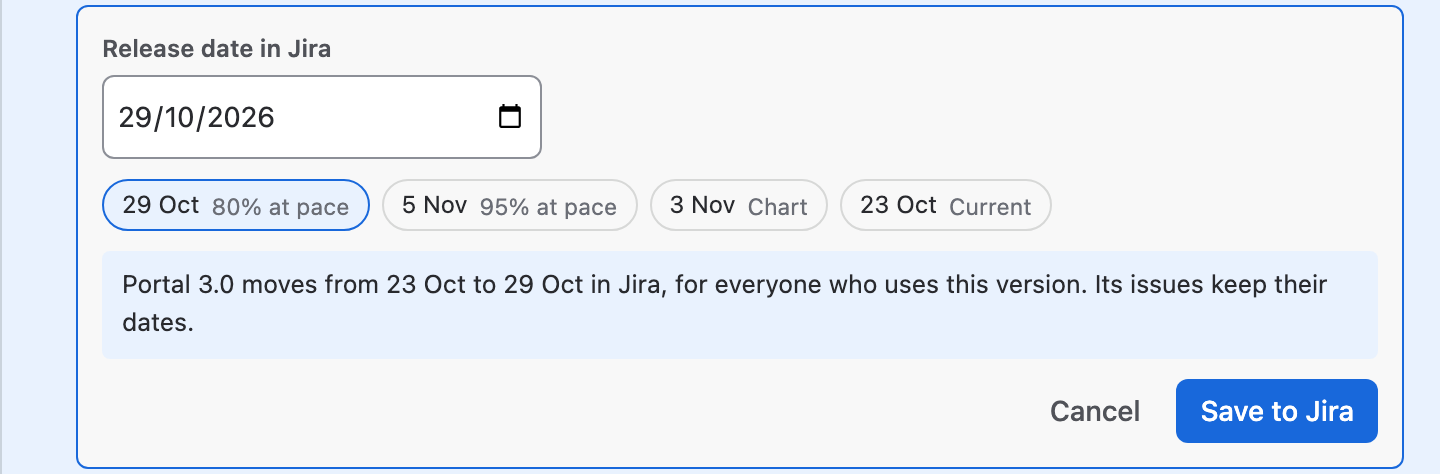
- Pick a suggested date, or type one in Release date in Jira. The suggestions are the 80%, 95% and 50% pace dates, the chart's finish when it is later than the release date, and the current date.
- Read the sentence under the dates. It says how the version moves in Jira, for everyone who uses it, and that its issues keep their dates.
- Choose Save to Jira. Ganttry writes the date as you and reloads the chart.
Create a release
- Choose New release, the plus at the end of the Delivery toolbar.
- Choose the Project, when you may manage versions in more than one.
- Enter the name in Name, as Jira will show it and, if you know it, a Release date.
- Choose Create in Jira. The version is created unreleased. Issues join it through their Fix version in Jira.
Milestones
Choose Milestones to list the chart's milestone issues, those with no duration, by date. Upcoming counts the late ones, each row shows the issue, its date, its release and a tag such as 1d late or in 5d, and Done holds the finished ones. Select a milestone to find it on the chart.
Cross-project milestones lists the milestones of cross-project releases with their date, release and status.
Cross-project releases
A cross-project release tracks Jira versions of several projects as one release with one target date. When unreleased versions of two or more projects share a date, Delivery asks whether to track them as one and offers Combine. While you have none, the link at the end of Unreleased, Combine versions into a cross-project release, starts one.
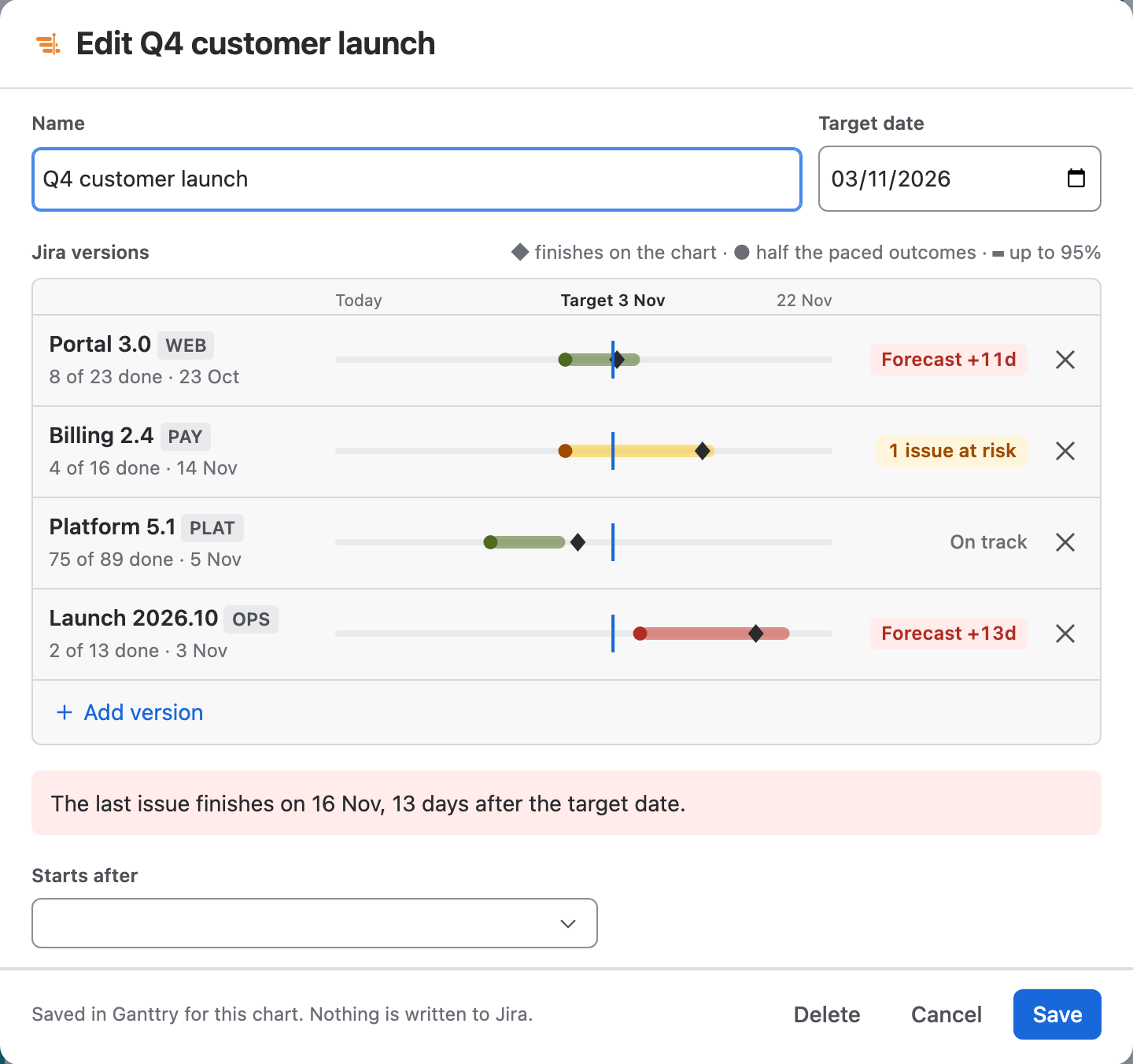
The editor holds a Name, a Target date, the Jira versions and the releases it Starts after. Each version is a track on one scale against the target: ◆ where it finishes on the chart, ● where half its paced outcomes land and a bar up to 95%. A sentence under the tracks gives the worse answer: the day the chart finishes the release, or the version that holds it at the team's pace. Add version finds another unreleased version, listing first those also due on the target date.
Choose Create or Save. Delete asks once more before it removes the release.
Gates, milestones and readiness
Select a cross-project release to open it. It shows the chart and pace answers for the whole release, the releases it waits for, its Jira versions with their tags, its Release gates and its Milestones.
Add gate adds a gate with an owner; each gate's owner and status, Open, Passed or Blocked, change in place. Add milestone adds a dated milestone with the same statuses. The cross next to each removes it. Edit opens the editor, and Show on chart and Locate date work as they do for a single release.
| Tag | Meaning |
|---|---|
| Ready | All its issues are done, every gate and milestone has passed, and no release it starts after holds it. |
| Blocked | A gate is blocked, or a release it starts after has a gate not yet passed or a later target date. |
| Forecast +Nd | On the chart, its last issue finishes N days after the target. |
| +Nd at pace | Half the paced outcomes of the version that holds the release land N days after the target. |
| N open gates | N gates are still open. |
| On track | Nothing above applies. |
Releases on the chart
Dated releases appear in the timeline header, with how many of their issues are done, and a line down the chart on the release date. Choose Group → Release to arrange the work by fix version, or show the Release column in the Board table.
What changes Jira
- Save to Jira and its Undo change one version's release date in Jira, as you. The version's issues keep their dates.
- Create in Jira creates one unreleased version, as you.
- Cross-project releases, their gates and milestones are saved in Ganttry for the chart. Nothing about them reaches Jira.
- In a combined chart, Delivery lists each chart's releases under its own heading and has no cross-project releases.
- In Confluence, Delivery is for reading: there is no Change date, New release or Select issues.
Stuck on something this guide skips? Write to the developers →