Scenarios and baselines
Try a change, compare it and keep what works. Branches, comparing with the parent, merging, and baselines that measure drift.
12 sections6 min readUpdated October 2026
Main and its branches
Every chart has Main, the plan you publish to Jira. A branch is a copy of a plan in which you can move work without changing the plan it came from. You can branch from Main or from another branch, compare, and merge the result back one level at a time.
- A branch has its own bar placements and its own notes, and keeps its own Undo while the chart is open.
- The calendar, people, teams, estimates, dependency types and lag, settings and baselines belong to the chart, so every branch shares them.
| Main | A branch | |
|---|---|---|
| What it is | The publishable plan | A copy of its parent that then changes on its own |
| Publish to Jira | Yes | No. The button reads Merge instead |
| Rename or delete | No | Yes |
| Branch from it | Yes | Yes, down to three levels below Main |
Open the scenario tree
The left of the header says where you are: Charts / chart / branch. Click the branch name, which reads Main on the publishable plan, to open the Scenario tree.
Main carries a blue flag and the note Publishable plan; each branch says which plan it came from, and the plan you are on is marked. Hover a name to read it in full with its parent. Click any plan to switch to it.
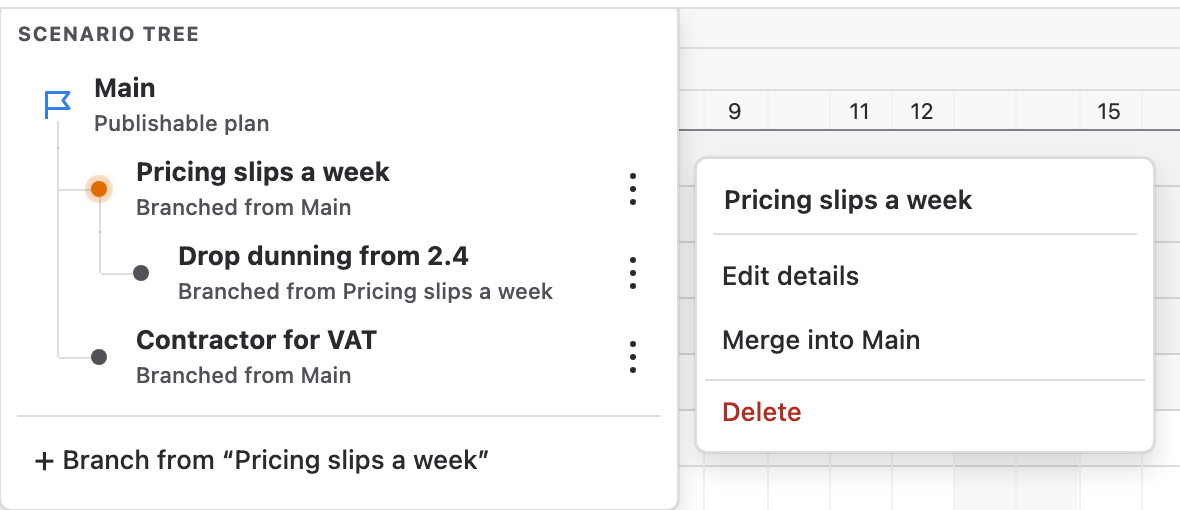
Create a branch
- In the scenario tree, switch to the plan you want to copy.
- Choose Branch from “…” at the foot of the tree.
- Type a name of up to 60 characters and choose Create branch.
- The branch opens at once. It starts with every placement of its parent, the parent's public notes and your private notes.
Work in a branch
Drag, resize and place bars as you would on Main. Every change is saved to the branch for everyone who opens it, and Main does not move.
The header counts the placements that differ from the parent, for example 2 changes from Main, and the Publish button reads Merge. Each plan keeps its own Undo while the chart is open, so undoing on a branch never reaches into Main.
The branch you choose stays in your browser, so colleagues keep their own. People on the same branch see each other's saved changes without a reload, and the presence avatars name the branch each person is viewing.
Compare a branch with its parent
The header count tells you how many placements differ from the parent, and the merge dialog repeats it before anything changes. To see both schedules, switch between the branch and its parent in the tree.
To keep the parent's dates on screen while you work, add a baseline on the parent before you branch. Baselines belong to the chart, so its grey tracks stay under every bar the branch moves, and work that now finishes after its due date turns orange.
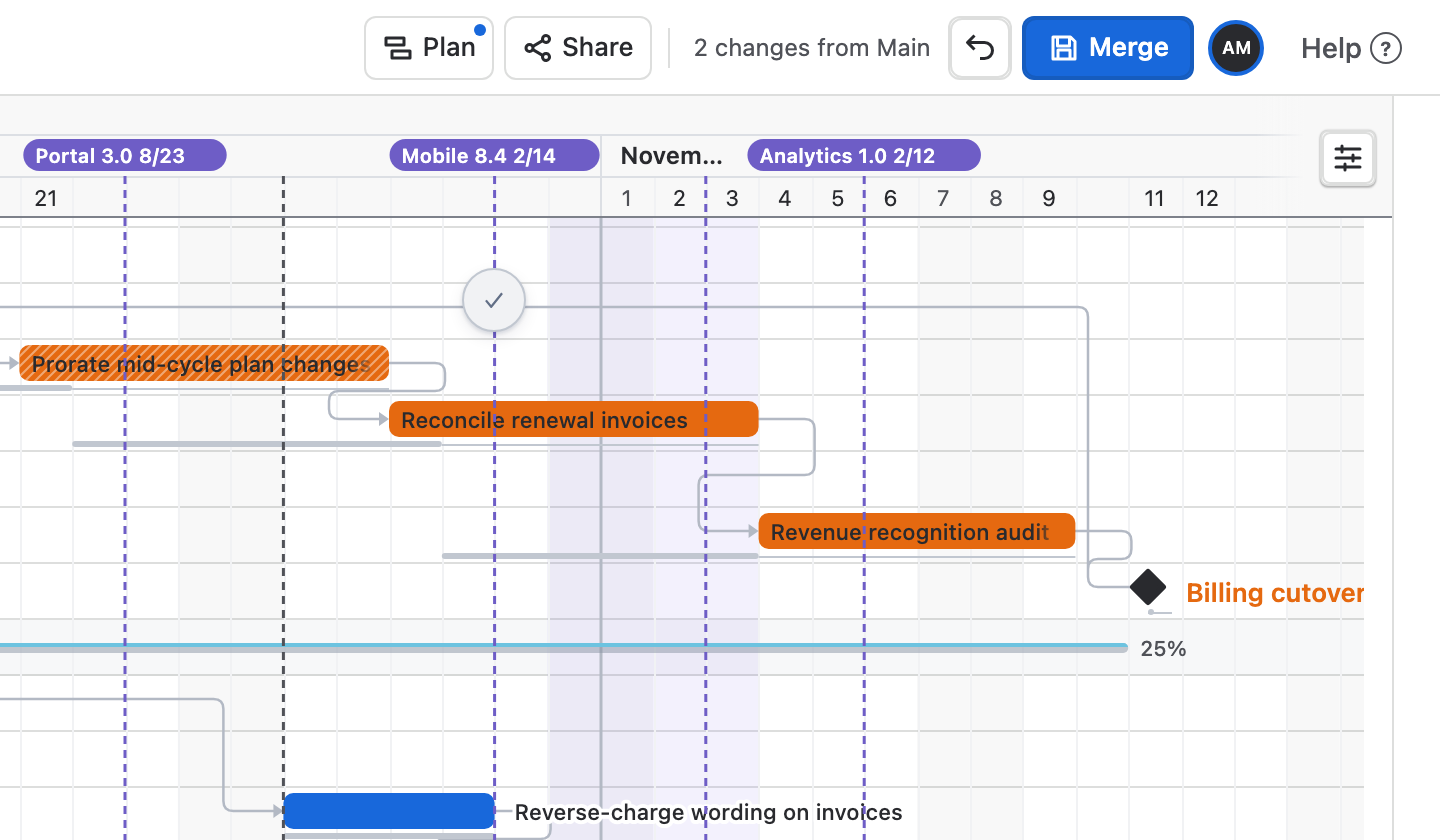
Merge a branch
- On the branch, choose Merge in the header. From the tree you can also open More actions beside a branch and choose Merge into ….
- Read the dialog. It names the parent and says how many placements differ.
- Choose Merge into …. The parent takes every placement of the branch, Ganttry switches to the parent, and a notice confirms that Jira was not changed.
- A branch merges into its own parent. To bring a nested branch to Main, merge it one level at a time.
- The branch stays in the tree after a merge. Undo on the parent reverses the merge.
- A merge moves bar placements. Notes stay in the plan where they were written.
- Merge is available once the whole plan has loaded. Colleagues viewing the merged branch get a notice with Switch to … the parent; Ganttry never switches them by itself.
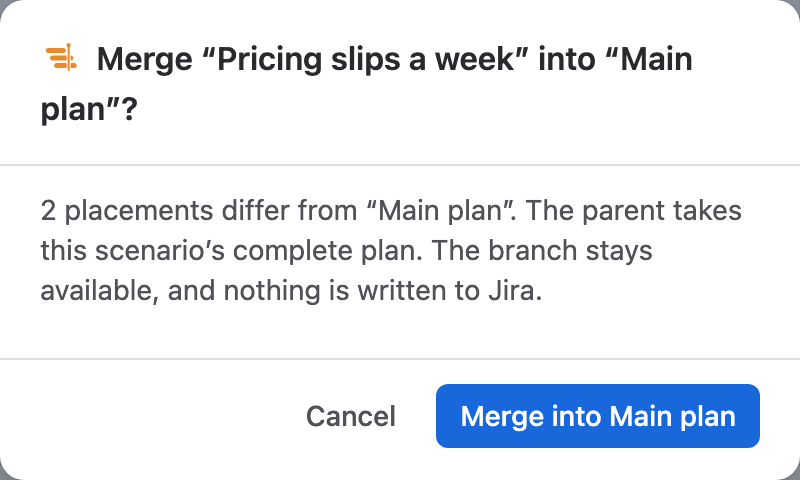
Rename or delete a branch
More actions beside a branch opens its menu without switching to it. Main has no menu: it can't be renamed or deleted.
- Edit details shows who created the branch, when, and when it was last edited. Change the Name and choose Save changes.
- Delete asks first. A branch with no branches under it is removed with Delete scenario; one with branches under it is removed with all of them through Delete branch. Nothing in Jira changes.
- Merge anything you want to keep before you delete a branch.
Publish from Main
Only Main publishes to Jira. When a branch holds the plan you chose, merge it into Main, switch to Main and choose Publish. The review lists every date that differs from Jira, and only the changes you tick are written, with your own Jira permissions.
Merging alone never changes Jira. Links you copy from Share open the branch you are on and warn when it is not Main plan.
Add a baseline
A baseline is a snapshot of the dates of the plan you are on. Keep one when a plan is agreed, so you can show later what moved. A chart keeps up to eight.
- Open Plan in the header.
- Beside Baselines, choose Add baseline.
- Type a name of up to 80 characters, or leave it empty, and choose Save. A baseline without a name shows its capture date and time in UTC.
- The new baseline is drawn on the chart at once.
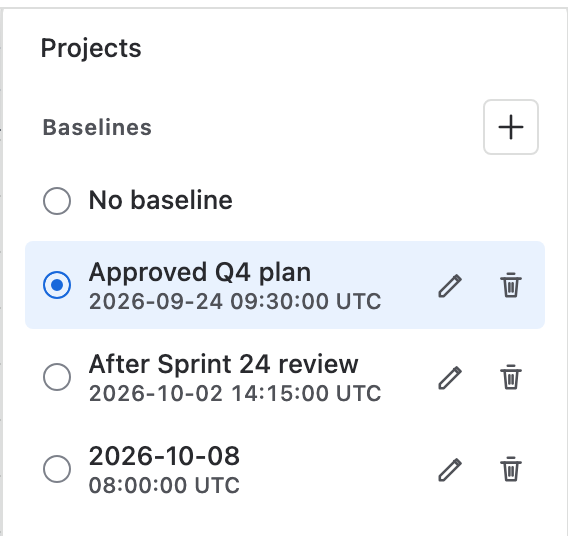
Choose, rename or delete a baseline
- Choose a baseline in the list to draw it on the chart, or No baseline to hide the tracks. The choice is saved with the chart's baselines.
- A dot on Plan shows that a baseline is drawn, and the Plan tooltip names it.
- The pencil renames a baseline in its row. The bin deletes it after you confirm.
- Baselines belong to the chart, so the same list appears on Main and on every branch.
Measure drift
With a baseline drawn, every bar has a thin grey track at its baseline dates. The tracks stay visible when their live bars scroll out of view.
For numbers, add the Slip column from Columns at the right end of the Board header. It compares each issue's finish with the baseline.
- The Executive Summary reports baseline drift.
- CSV exports carry numeric baseline variances, and PDF, PNG and HTML exports can draw baselines.
- Microsoft Project exports keep baselines as native Project baselines.
| Slip shows | Meaning |
|---|---|
| +3d | Finishes three days later than in the baseline. |
| −2d | Finishes two days earlier. |
| on plan | Finishes within an hour of the baseline. |
| new | The issue was not in the plan when the baseline was taken. |
| — | The baseline's finish was a date Ganttry worked out, not one set in Jira or by hand. |
Permissions
- Creating, merging, renaming and deleting branches, and adding, renaming and deleting baselines, need Edit Issues and Schedule Issues in every project on the chart.
- Scenarios and baselines belong to a single chart. A combined chart shows no scenario tree or baselines of its own.
- None of these actions writes to Jira. Publishing from Main does, as described in Publishing dates to Jira.
Stuck on something this guide skips? Write to the developers →